//go.ad2up.com/afu.php?id=662242

How to Solve the DWM errors on Windows 10 PC

If you are a Windows 10 user and you are experiencing some four annoying dialogue boxes popping up like every two minutes after you have clicked on close. The error like DWM (Desktop Windows Manager) has stopped working.

Revo Uninstaller Pro Review

Revo Uninstaller Pro does not only remove undesired program from your computer, it also look for leftover files and registry files of the same program.

Learn about Picasa

Picasa is a free image viewer and image organizer. It is designed to aid the organization of photo for easy search of your photo. This program is owned by Google and it runs on major Operating Systems like the Mac OSx, Linus and your favourite Windows OS.

COPYING DIRECTLY TO YOUR WINDOWS PHONE 7, 7.5 AND 7.8

Windows Phone 7 Registry Edit for Windows PC to Enable Windows Phone 7 USB Storage.

SHARE FILE FROM YOUR PHONE TO YOUR PC USING SHAREit ON BOTH DEVICES.

No matter the size of your file or folder, SHAREit will transfer it from your phone to PC or PC to phone within seconds.

20160604

Adobe Experience Design CC coming to Windows 10

Adobe Experience Design CC UI for Windows 10
Adobe is set to release an app for Windows 10 that will allow the design of Websites and Mobile Apps. The Adobe Experience Design CC will have a very friendly User Interface. Easy to use and it will offer support for Adobe Creative Clouds and Stock.

This Program is now available to Mac Users and it will be available to Windows 10 later this year and will be only through the Windows Store.

I know a lot of you how are developers will be glade to know this.

20160209

Badoo acquires Lulu

Badoo, the Global online Dating giant has official purchased the mobile App that allows which has be themed as a controversial dating app where women are allowed to review and rate men anonymously. This App is something else.

Why did Badoo actually buy this app? The London based Online dating plateform which has a its Web visitors and users from all over the world is actually going to introduce this tech to their Mobile app and also to their Web.

This is a good sign for women who has been played/exploited on the online dating platform can actually get to know there visitors before.

According to techcrunch Post, "The Move also sees Lulu founder and CEO Alexandra chong move back to the U.K. Capital from New York to join badoo as Presedent, Where I'm told she will be focusing on international expansion, business development and communication.

It has been noted that baddo has up 60 million active users.

20160205

SHARE FILE FROM YOUR PHONE TO YOUR PC USING SHAREit ON BOTH DEVICES.

TRANSFER FILE OR ANYTHING WITH OUT CABLE OR BLUETOOTH BUT WIRELESS FILE TRANSFER

SHAREit make transfer very easy and fast between your PC and other Deveices or Phone to phone, Tablets.
Shareit makes transfer from PC faster and easy. Wonder how to transfer file like music or your installed program to  your Laptop for backup just as you use Xender which allows you to share anything on your device to another device with a very high speed making use of your wireless and no cable or removing of your microSD?

What is Shareit? It's a free file sharing app that works across multiple OS without using the internet but just a simple connection.

Now you can transfer music, photos, videos documents, file and others between more devices.

All you need to do is to get the app or program installed on your Phone, Tablets and PC to enable a successful connection and possible transfer.
Shareit Transfer can be done between almost all OS and Devices without internet connection or cable 
Open the Program in your PC if you are sharing to or from a PC, the create your own personal network by clicking on the click here below the phone image on the program then from the pop up window, enter any choice of character as your pass word or use the default "12345678" then click create and close the window. Click on the phone and will automatically move to a new window of QR Code will appear for you to scan with your phone
Then from the phone you either touch the send button, pick the content you want to send, choose the receiver and hit send! You will be connected to send files back and forth.

With a QR Code provided by the PC SHAREit, quickly pair your phone to your PC to start transferring files!

You can also connect to the PC by sweeping from the left and touch the "Connect to PC". 
Now Scan your QR code of the program from you computer and automatically join the network. connection may not work just follow the on screen instruction by manually joining the hotspot network from your PC and return to the app on the Phone. Then Bum, that is it. sharing may take place for any file since no file file resstriction.

With a QR Code provided by the PC SHAREit, quickly pair your phone to your PC to start transferring files.

"Transfer files, photos, videos, documents and more 
No matter the size of your file or folder, SHAREit will transfer it from your phone to PC or PC to phone within seconds. 
No need for WiFi, cables or mobile data charges, SHAREit will send your files easily and conveniently." 

20160129

WHATSAPP BECOMES FREE AND WILL BE COMING WITH NEW IMPROVED FOUNTIONS

Whatsapp Community
It has become a culture to have Whatsapp messager on your Smartphone. More than a billion people around the world today depends on WhatsApp to stay connected with their friends and family daily.

Whatsapp has evolved from just being an App on phones or tablets but it has become a very useful tool and a part of so many people. They no longer value their Devices once their Whatsapp Subscription has expired.

According to Whatsapp Blog, they stated that Whatsapp will nolonger charge for using the application as a messaging tool and so, therefore, th Users will have an unlimited use on Whatsapp. 

"That's why we're happy to announce that WhatsApp will no longer charge subscription fees. For many years, we've asked some people to pay a fee for using WhatsApp after their first year. As we've grown, we've found that this approach hasn't worked well. Many WhatsApp users don't have a debit or credit card number and they worried they'd lose access to their friends and family after their first year. So over the next several weeks, we'll remove fees from the different versions of our app and WhatsApp will no longer charge you for our service."

They also made it Clear on how they will not make ads become part of it since no more subscription fee as everyone will begin to wonder how they will keep the App running without charges so, they plan on making Whatsapp a platform like WeChat app which has other supported extensions to be installed on it. This will definitely become a major income benefit to the Whatsapp as it will like to commercial firms like banks and other institute like online markets, hospitals and other others like TV Stations followups. Some other additional features will be added according to stated in Whatsapp Blog.

"Naturally, people might wonder how we plan to keep WhatsApp running without subscription fees and if today's announcement means we're introducing third-party ads. The answer is no. Starting this year, we will test tools that allow you to use WhatsApp to communicate with businesses and organizations that you want to hear from. That could mean communicating with your bank about whether a recent transaction was fraudulent, or with an airline about a delayed flight. We all get these messages elsewhere today – through text messages and phone calls – so we want to test new tools to make this easier to do on WhatsApp, while still giving you an experience without third-party ads and spam."

20160127

Firefox added support push Notification to the recent 44 Stable Version

Mozilla Firefox
Mozilla has made a new addition to it Web browser. Mozilla Firefox 44 Stable Version has got an additional feature like the push notifation.

Yeah, yeah! Push notification. It's just coming to the browser giants for the first time. This means you can get notification from any website from your favorites websites like your Twitter, Facebook, or social networking sites, e-commerce sites and even from your email or any site that supports it. 

This feature can any ways be manage from your Firefox Option > Content and then notification.

This feature is not new to some other browsers as Mozilla has just decide to come to add it to Firefox. browsers like Chrome, Safari and opera has got this feature before now. So, it will be left with Microsoft to get it in-cooperated in to their new browser, the Microsoft Edge which actually lack a lot of features.

Other addition to Firefox 44 includes the  improvement on warning pages for certificate errors and untrusted connections, also enables H.264 video playback as long as you have a native decoder in your PC and enables WebM/VP9 video support on systems that doesn't support MP4/H.264. 

According to Techspot,
Developers that want to implement push notifications on their website can learn more by checking out this Hacks blog post.


20160113

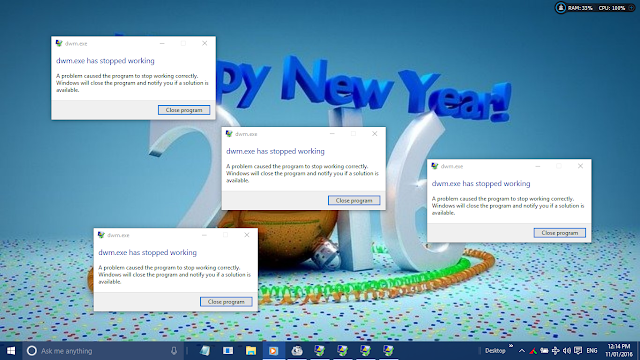
How to Solve the DWM errors on Windows 10 PC

STOPPING THE DESKTOP WINDOWS MANAGER ERROR

Desktop Windows Manager
If you are a Windows 10 user and you are experiencing some four annoying dialogue boxes popping up like every two minutes after you have clicked on close. The error like DWM (Desktop Windows Manager) has stopped working. 

This is normally caused by errors due to malware and other programs.

This pop up is so annoying and stays on top of what ever you do. You may decide to drag it down to the end of your task bar or any where you may not be seeing it since you can't actually close it.

There are some methods you can use to actually stop this if you are using a previous version of Windows but in Windows 10, It is not the actual solution because it is more suborn.

The other solution you may want to try are using the event viewer or using an Anti-Virus or Services or even ending the Task from Task Manager.

All those procedure are not the solution in Windows 10 since it may stop for a while or when the system is restarted, it will pop up again. This is now very annoying and tire-some since you have to be repeating these processes again and again.

Windows Task Manager is the total cure. Lol. Its funny right? I just used the world cure but not a permanent one.

Using the task manager may will just stop it from popping up again till a restart of Windows since the task manager is the easiest and fastest means of preventing the pop up.

When you power your System, after a complete loading of the startup programs, start the task manager from either right clicking on the start menu button and choose Task manager from the Context menu or right click on the task-bar and Choose Task Manager or from your Keyboard, press together the CTRL+SHIFT+ESC keys. Either of these three ways will open the Windows default Task Manager. Once the Task manager is opened for some time or till you shut down, there will be no annoying pop ups.

Try these method and see.

20151119

WhatsApp Messenger -Taking WhatsApp with you | How to Use WhatsApp on web

www.whatsapp.com | How to Use WhatsApp on Web

Logo
WhatsApp Messenger
As we all know, WhatsApp Messenger has been just a smart phone application. WhatsApp was design for the sole purpose of cheap and quick messaging mobile cross platform instead of the expensive cost messaging then at it early Lunch. People can easily use a wireless network service or a premium data service which will definitely reduce or cost nothing since that subscription covers a variety of purpose not just WhatsApp as the cash maybe, though airtime was used in its early days even till since it takes less than 5KB for a 3page text.

WhatsApp was found in the year 2009 by two formal yahoo! staff Jan Koum and Brian Acton.

WhatsApp Early Days

WhatsApp was first lunched for the iphone in 2009 and was then incorporated as WhatsApp Inc., in February 24, 2009. In that same year, WhatsApp growth was very fast so also, investors. WhatsApp then introduce the Verification SMS which will be sent from your phone at a little cost as that will now covers for the the service. This was done to actually slow down the growth as the number of staff may not match the growth.

Gradually the Image sending was introduced to WhatsApp to cover for the use of the MMS since it take very small size of picture. Later on as WhatsApp surpass the normal text message or Multimedia Messages, they Added the Voice and Video message feature and the and in the read receipt feature which allow one to know if their message has be read and in January 2015, WhatsApp added the Voice Calling Feature.

WhatsApp growth in Smart Phone

In November 2009, was when WhatsApp was actually launched officially and was exclusive to iPhone App Store and it later came to the BlackBerry OS in January 2010 and The Symbian OS in May 2010 and in August that same year, it was introduced to the Android OS. It was later in August 2011 in came to Nokia S40 and in September that same year it got to the Windows Phone and the BlackBerry 10 OS in 2013. It was later introduced 2015 to the Samsung's Tizen OS. Some unofficial Port was was released for other OS that don't have the luxury to get the official version.

WhatsApp Acquisition by Facebook

Facebook announced it was acquiring WhatsApp for US$19 billion on February 19th, 2014. This lead to a turn around as critics flew in the air.

WhatsApp Web
WhatsApp Messenger
WhatsApp Web

WhatsApp web was officially introduced in January 2015 by Jan Koum on his facebook page that:
"Our web client is simply an extension of your phone: the web browser mirrors conversations and messages from your mobile device—this means all of your messages still live on your phone".
 The WhatsApp Web version is an extension of the WhatsApp in your device, though it looks very similar to the interface of an Android tablet's. This means that WhatsApp Messenger on your device is simply left any where your allow as you use your PC while you surf the net. No need to bother yourself with every ping of WhatsApp message receive. The Web version for PC uses the Web client and so the WhatsApp on your device must be connected for the Web version through your browser to work effectively. This may consume data from both device. I will advice you use a Wi-Fi network or a Premium Subscription.

Your contacts and all your recent chats will be available once you have successfully activated the WhatsApp Web.

How to Activate the WhatsApp Web and WhatApp Messenger

 One must have the WhatsApp Messenger installed and registered with a Phone number, activate it with a verification code recieved in that same registered number.


The WhatsApp application will automatically compile all the contacts or phone numbers from the address book of your device and then compare it with the WhatsApp central database of users to automatically add matching registered contacts to the your WhatsApp contact list so as to avoid the find and send friend request.

So also, this step is not the same in the Web Client Version since it only mirrors your Device WhatsApp but its very efficient.

WhatsApp
WhatsApp Web

To get started With the PC Web Activation, simply click the WhatsApp Web link to begin. From the list of Tabs, Click the WhatsApp Web Tab, then scroll to the bottom of the page and see how to activate it with your Device by Scan the QR Code. It will automatically Scan after you must have selected WhatsApp Web from your device WhatsApp menu and that will open the WhatsApp Web on your Browser. Make sure you tick the keep me signed in if not already ticked unless you want to sign manually each time.

There are web browser extension which you can download that will enable swift notifications if you didn't open the page.
WhatsApp
WhatsApp Cross Platform

To get the WhatsApp Messenger for your Device, you may want to click on the following links bellow to Download them form your Device respective Stores.

20151116

MICROSOFT RELEASED A MAJOR UPDATE FOR WINDOWS 10


WINDOWS 10 BIG NOVEMBER

Windows 10

Microsoft made Last Week Thursday 12th of November 2015, a memorable one by releasing a large update for Windows 10 as this is a major update since the release of Windows 10 back in July.

As these Updates are rolls out to all Windows 10 devices like PCs, Tablets and Select Phones. So, if your device is already running Windows 10 and thinks this update is not for you, it is since it has performance improvements which will actually make you PC 30% faster than your Previous Versions. So also, there are other updates which are under the hood.
As the up came to my PC on 13th and I also run this update to some of my clients. I also downloaded the November Update with the Microsoft Media Creation Tool which you can get from Microsoft Site.

There are also other minor updates like the:

  • ·        Tablet Mode which been improve to work like Windows 8.

  • ·        The option for Windows to manage your default Printer.

  • ·        The option to turn off your Default Windows background.

  • ·        A built in Skype split in three like, Video, Phone and Messaging. That does not stop one from install the regular Skype Application like I do have the both on my device.

  • ·        Installation of Application to wherever one desire.

Microsoft also made the licensing of Windows 10 easier since all users can use their existing Windows 7 or Windows 8 or Windows 8.1 activation key on it. So, it will not require you to install an older version of Windows on your PC first to do the free upgrade.

The Start Menu has also gotten it as the number of tiles has be increase from 512 to a whole 2048. Who is going to have that much tiles on the start. Now the Tile Column can now be stretch to 4 instead of its previous 3.  Even the Context menu has been improved a little.

Now, Microsoft has add the Find my Device feature to this Windows 10 upgrade which will allow you to track your Laptop, Tablet or Phone if lost or stolen as the feature when activated sends the device current Location  to the Microsoft Server as it keeps track of the device timely.

All fans of a the previous Window Title bar can now have a reason to rejoice as the Title bar can now be colourful as it was. When Windows 10 was released, it never allowed the Title Bar Colour change as one change the Start Menu and Task bar colour, it also now affects the colour on the Title bar. This can be done in Settings > Personalization > Colour. You can now turn the button on for the right settings.


Cortana also receive its own update. Cortana can now understand Hand Written Notes, Track your movies and Tickets from your email and also alerts you on coupons from sites you have visited in Edge and also synchronise your call history and SMSs with your With your Windows Phone, as it will notify you of any missed calls in the case you didn’t take your calls due to not been with your Windows 10 Mobile. This person assistance has grown tremendously as it know when to even put your PC to sleep. With this update, Cortana now knows what you need better. To crown it up, Cortana now recognise other local accounts, so you don’t actually need to have an outlook account to use Cortana

20151104

Xiaomi Found a new Market

Xiaomi Home

Xiaomi has finalized  the arrangement of coming to sell there device in Africa as Africa has been in the fore front of more recent technological advancement in the direction information Technology.

The Chinese company said they will be selling the their Device line up of the Redmi 2 and Mi4 and the device will be at the vary price of $160 and $320 begin from South Africa, Kenya and Nigeria before entering other countries.

The Xiaomi’s Global Strategy Director Raymond Tian Said in a statement that “We see Africa as the next frontier for smartphone growth and we are excited to be partnering with MIA Group to offer consumers in these three countries our high-quality smartphones at amazing prices.”

It is stated that Xiaomi has made the Mobile in Africa (MIA) Group the chief and sole seller in Africa. MIA Group has presence in 14 African Africa countries as a full-service distributor for the markets, which service includes importation, logistics, marketing, and support services.

20151103

IObit Uninstaller | Review

The Little Super Uninstaller

IObit Uninstaller Logo
The IObit Uninstaller is a very powerful application Remover with one of the world safest means of application removal tool.
IObit Uninstaller is designed to maintain the way applications are removed from one’s System as to their location in the System. So, when uninstallation begins, it analyses the application to the depth and make sure conflicts with other programs in the same directory are not affected.
This application is so wonderful and its work is basically on uninstallation and removal of Applications and file from one’s Computer System Totally except that it does not possess the other operational functions of VS Revo Uninstaller.

IObit Uninstaller | How it Works.

It has one of the simplest interface of all installers you can find anywhere and it is attached to the Default Windows Uninstaller Programsand features Like a button.
When launched directly from click on the Desktop icon or from the Start menu or from the added button on the Default Windows Uninstaller. It will display this unique User Interface with the Menu on the left while every task is carried out on the other part of the entire display screen.

Uninstall: All that is done in this program is to uninstall. By default, the Program menu is activated showing all the user installed programs on the system with their details like the size, Date installed and the Version of the Program installed.
From here, all the programs can be removed from the computer easily without stress on one’s part depend on the settings given to it.
Uninstallation can actually pass through these simple four steps like clicking on the trash can after the program name just before the program's size and version.
The second method is to just select the program then click on the round big uninstall button at the bottom of the 'All Program' menu list of your IObit uninstall.

The third is known as the batch uninstall where one have to uninstall series or certain numbers of programs sequentially by simply clicking on the batch uninstall at the left top of the 'All Program'  menu display section.

And the last is the method of Uninstalling in the IObit Uninstaller is the IObit force Uninstaller which allows one to make a very thorough scan by either typing the exact name or a part of the program and also dragging the program icon from the desktop or anywhere it is on the system to the dialogue box of force Uninstaller of the IObit Uninstaller. Then click next or OK to jump to what its design to actually do.

In all this process, the uninstallation dialogue box of the IObit Uninstaller will begin with the process of asking whether to create a system restore point.  It actually very nice to create a system restore. Point in the case of some thing happens to your computer and your need to restore to a previous restore point and it gar from the particular date.  You know what that means if you do that, lose all changes made after that date apart from user data.

After the restore point has been successfully created on the system, then it will move to the next section of the dialogue box Uninstallation Program and the built in on Uninstaller for that program will pop up and used to uninstall program from the system so after that, the IObit Uninstaller Uninstall at ion dialogue box will shift to the section where it will allow for the deletion of remainder of the program if there is actually any left over after the Uninstallation and scanning. This. Method can be done actually by clicking next and finish or simply select the check box at the bottom left the dialogue that says don't ask for next, so one Uninstallation will be down automatically except for the program's defaults.
From the Programs menu these other options for a quick find of programs van be seen. Just as Recently Installed programs, Large Programs, Infrequently Used Programs. All those options use the same methods of uninstalling.

TOOLBARS AND PLUGINS:  IObit uninstaller actually allows for the Uninstallation of those troublesome Toolbars in your Web browser and those annoying plugins that actually pops up with ads everywhere on your browser and there by consume more of your band width.  This is easily done by clicking on the Toolbars and Plugins menu, then, the All Toolbar s and Plugins option will be opened by default. Now one can clicking on the trash can to remove the annoying toolbars and plugins.
Other option that can also be found. Under this menu are all the browser type found on your System.

WIN MANAGER: The Apps option is just for Windows 8 Windows 8.1 and Windows 10 only because of the Windows Universal Apps. This option is actually not available or working in Windows earlier than these. Here, U can do a batch uninstall or simply use the trash can by the app or select the app the click on the large round install button.

The Start-up options are also another in Win Manager as it will enable you to find Programs that auto runs on Windows start-up and tend to slow your start up time, so, you can therefore stopping the app by Disabling them or Uninstalling them from the Disable/Enable option or the trash can to remove or Use the big Uninstall button..
The Process option is just a simple way of stopping programs End Task which are taking up your system resource or not responding and so tend to slow down the system or cause lag. You can also uninstall program process from this option.

The Windows Update option allows you to find the recent update done to you PC from the windows server and allows you to uninstall any update that you did and affects the operation of your system either by Batch Uninstall, from the Trash Can or the big Round Uninstall Button.

Tools menu: This menu consist of four options which are:
Clean-up Residues requires one to scan the system from the big rounded scan button for junk files, residues of applications during operations by the User or left over of programs Windows Patch cache from Updates and also browsers download that are actually taking up space. Once the scan is down completed, the big rounded scan button will now change to clean. So, now you can clean.
Uninstall History option is does no other thing than just to save the logs shows the state of uninstall. If you have a pending uninstall leftover scan to do, it will state.

The File Shredder option on IObit uninstaller allows you to make an unrecoverable delete from your system. Like when you delete something from your Computer, it actually did not delete it remains on the disk due to system performance and thereby leading to finding it with a recovery tool but may not be with that same name or none since the name will be deleted even when the disk is formatted, it may still be recovered. So, Shredding will allow you to delete the data permanently from your disk. To do this with IObit Uninstaller, Just select the File Shredder option from the Tools Menu and either drag the file or whatever you want to shred into the space provided on the right or simply click on the add file or add folder options and select from the directory where this file is Located and click on Open or OK to select. Then, click on the Big rounded Shred Button. That’s should be all.

The Windows Tool option is built and designed for those that finds it difficult to find the Windows Administrative Tool. You can easily get all from this option from the Tool  menu.

You can download the setup from the direct link

20151012

THE NEW MICROSOFT SURFACE BOOK


The Ultimate Laptop


Microsoft Surface Book
A week ago, Microsoft revealed the company's first Laptop the Surface Book. The device is Tag the Ultimate Laptop. 
Wow! What a Tag. A laptop that is so powerful and so much flexibility as to use by all persons in what ever area/field they'll be using it. It is packed with a 13.5-inch Detachable Pressure screen that can be use on the go, it also comes with the new PixelSense technology, the new Surface Pen, the Gorilla Glass 4 for protection. The Surface Book comes with DDR5 RAM upto 16GB, 1 Terabyte of Storage, Nvidia GeForce GPU, with a battery life of 12 hours. According to Microsoft, the device is 2 times faster than the MacBook Pro. Watch that video below to help you know more as the Surface VP Panos Panny Make a live Preview.


The cost of the Surface Book will starts at $1499 and it is presently available for pre-order and it will be coming on October 26th.

20151011

REVO UNINSTALLER PRO REVIEW

REVO UNISTALLER PRO

REVO UNINSTALLER PRO 3.1.4
Revo Uninstaller Pro by VS Revo Group Ltd. It is probably the best uninstaller program out there. This uninstaller is a third Party Utility software and that it program functions are nearly unlimited, Quick and Easy to understand User Interface.
Revo Uninstaller Pro does not only remove undesired program from your computer, it also look for leftover files and registry files of the same program.
One very good thing to know about Revo Uninstaller is that it does not eat into your System resource like running at the background of your Computer and it will not take up space in your RAM or Clock your Processor when not lunched but it can actually be set to Autostart.
Revo Uninstaller Pro can only load into your RAM if you lunch it and will only function if you execute a task with it. Your system will continue to run smoothly if you it is even running and performing a task. It will not cause any lag to your system.

How it Works/User Interface

Revo Uninstaller Pro when launched, it has a very simple UI but first will require an administrative privilege to function for a successive launch else it will not. It will display the All Program Tab by default. This display has three basic view of Icons, List and Details.
Revo Uninstaller has four (4) default Bars apart from the default Windows Applications Title bar. So, these bars are the menu bar, Command bar Discription bar and Status Bar. It have other bars like the tool bar and the main toolbar.
Now, let’s discuss the act of Revo Uninstaller Pro.
Traced Programs: It shows all the Uninstallation logs of installations traced Program using Revo Uninstaller Pro. By default, when clicked, it will now open a new tab and so, the created logs will be shown in Icons and when you click on an item log, it will now show description panel bar the properties of the log like: Icon, Size, Date, Registry items and Files and Folders.
Logs Database: The display shows all the Logs from program installations as they create their installation database in the system so thereby making a series of change to the computer like the Registry files and folder. This means Revo Uninstaller Pro has its way programs are logged and so therefore, the uninstallation of the logged program will reverts all changes just as they were made to the computer during its installation.
Install Programs:  This allows the installation of programs from Revo Uninstaller Pro from the particular directory while Revo Uninstaller Pro will now log the installation process of the program into the system as it will monitor the process of installation and so create it’s Log database to help uninstallation process as it will not do the normal scanning algorithm since it has be logged.
Forced Uninstall: Revo Uninstaller Pro is rice packed with these powerful features such as the force Uninstall. This feature does nothing but helps locate and remove leftovers of programs which has already been uninstalled or incompletely uninstalled using the Windows default Uninstaller Package which means there will still be remnants of such programs on the computer. Revo Uninstaller pro force Uninstall requires just two (2) parameters to make this possible, (1) the exalt name of the uninstalled program. In the case where the entire combination of the Program name is not totally known, a semi-column (;) may be used to separate the name. (2) The full path to the program file, when it did exist. So, no mistake can be down as Revo Uninstaller Pro make sure any error in the taped location or file name will display an error message.
Uninstall: This function is actually designed to make remove programs from the computer not just as an uninstaller but this added function was built in Revo Uninstaller Pro to make it so special and easy navigate since it has a Wizard to guide. The Wizard in Revo Uninstaller Pro only create a System restore point, a do a registry backup, invoke the program built-in default uninstaller and then look for left overs of that program, then the program’s registry file. All this can be done so, one can delete them to create some more space in the hard drive.
Hunter Mode: This is tiny movable blues circle with a target which allows one to perform superior task of uninstalling programs by just dragging the Hunter circle to the Program icon on the desktop though it will result to the flay out of its own context menu for one to make do with what one choose like Uninstall, Stop Auto, Kill, Kill and Delete, Open Containing Folder, Search at Google for, Properties, Cancel. Actually, this does not just work on desktop apps only, but on opened programs or even from system try notification also.
Backup Manager: This option helps in the managing of backup information stored by Revo Uninstaller Pro after deletion of Registry entries, files and folders if the necessary options are set.
The AutoRun Manager: This feature is found in the Toolbar and it is very Unique in the aspect of managing Windows Start-up program also known as the autorun programs. A lot can be down from here since you can get information on programs Autoruning and even find the program installed location. It procedures are not different from that of the Windows Task Manager but a little more advanced. Functions like: Making not running programs Run by just selecting and clicking run.  It is also possible to Kill an already running program so that program will quite its process and also delete the process. To remove startup programs from the list of Startup list and prevent its auto startup when Windows start, also, unchecking may be the best way to do this for the program to remain in the list but not run until otherwise re-check it. Programs can also be added to auto start on Windows Startup. There are several more command you can execute here.
Junk Files Cleaner: This function allows the finding and removing of various types of junk and unnecessary files from your computer. Files that are actually leftovers from closed programs which may actually cause a chucked up hard drive.
Windows Tools: This is a very useful tool because it helps people to find it easy to get their Windows administrative Tool.
Browsers Cleaner: This here helps to eradicate trace like Web History, Address Bar History, Cookies, Temporary Internet files, etc. This feature works for the selected browser options only.
Microsoft Office Cleaner: This feature alone will make any one believe Revo Uninstaller  Pro is just design to work with Microsoft OSs to remove history of most recently used files in Word, Excel, Access, PowerPoint, etc.
Windows Cleaner:  With this tool, one can easily remove all Windows Traced history, empty Recycle Bin, delete temporary files, freeing more disk space.
Evidence Remover: Revo Uninstaller Pro comes with this sophisticated tool that will actually remove trace or permanently delete deleted files and folder from ones Hard drive or whatever removable drive forever and there will not be a single chance for it to be retrieved or traced even by professional or expensive  recovery tool.

Unrecoverable Delete: This tool is almost like the Evidence Removal but this time, one have to add the file or the location of a file to it and not actually searching for already deleted files.

To download the Revo Uninstaller Pro click here, and if you need the crack if you can not afford it, then just place your request at the comment box.

You can get the Revo Uninstaller Pro Tutorial and User Guide direct from here if you do not know how to get it from the program.

UNINSTALLER | REVEIW

UNINSTALLER

Windows Uninstaller

Uninstaller is a Utility Software designed to remove other software from a computer. Every Operating System is built with Variety of utility software and Uninstaller is one of them since their basic function and only function is to make change and uninstall whatever program the user desire.

If you are familiar to the dysfunction of the inbuilt Windows uninstaller which does little change to the removal of the programs you do not need it any more in your computer

These Uninstallers are very limited to these functions so, other program developers came up and made a successful and a proper way of uninstallation and not just to uninstall but to remove the components/parts of the software that remains after removing the executables and other parts of the program. Uninstaller is designed to remove other software and parts of it from a computer since the program has multiple directories, or where some software components might be shared between the system being uninstalled and other systems that remain in use.

Uninstallers are very useful when software components are installed in different directories just as most programs will live there junks and even registry components in the system.

20150916

Microsoft to Discontinue Zune Music

Windows Zune
WIndows Phone 7 users should now prepare a wave of bye to Zune Music as Microsoft has made an announcement yesterday that they will be shutting down Zune Music.

Zune will no longer have the online streaming capability taken effect from November 15th. All Users are now advised to migrate the the new Windows Groove service.

This means that Zune will just be an mp3 player only and no more podcast or anything relating to an online capability.

Source: BBC

20150913

How to Hard-Reset a Symbian Device

The Good old Symbian. The best at that time and at what it does with Nokia, Sendo X, Motorola, Sony Ericsson's and Samsung.With Nokia, it works best.


The Nokia s60 and the Other brand before it like the Ericsson's Symbian Devices are the the beginning of Smart-phones and they are made people understand that the Tech in Phones are not just ordinary Tech but a tech that will definitely evolve to a tech that will someday surpass the Ordinary computer as people will be able to use it every where, anytime of any day as long as they are charged. 

GET WINDOWS 10 UPGRADE FORCEFULLY.

Ever Wonder why you haven't got notification of Windows 10 upgrade on your present Windows?

The “Get Windows 10″ icon opens a dialog that hypes the upcoming Windows upgrade and determines your availability to receive it for free.

Picasa Image Viewer.

Picasa Logo

Introduction to Picasa Image Viewer.

What do you know about Picasa? Many of us still do not know about Picasa or heard of it. Some of us may have heard of it but have not seen it in use or may have but do not understand it at all. Some do not know is an image viewer. Some have it installed on the Personnel Computer all because they saw it in other peoples Computer and so also, it may be installed in their computer by their engineer to act as their substitute image viewer. These people may not even remember it Picasa is residing in their computer or may not know their engineer may have installed it in their PC till someone else decide to load it on or look for another image viewer in the PC. Some engineers may set it as the default image viewer for the PC owners to eventually use Picasa and the may not know it but they will surely notice it beauty as the use it and its difference from the previous or default image viewer and they still do not know that Picasa is owned by Google.

Microsoft Image viewer has come a long way since Windows XP days and it’s still the default to so many users. Microsoft Image viewer has really evolved from the Windows Picture and Fax Viewer in Windows XP and Windows Photo Gallery in Windows Vista, While on Windows 7, it is Windows Photo Viewer and also for Windows 8 but still have the Windows Universal App Photo and on Windows 10 it is the same Windows Universal App but this time, it is far more advance but poor photo organization and its experiencing much in update.

So many Users believer the best application to be used as default it is the app that came with the PC or made by the manufacturer of that PC or OS. But, I have to tell you that is not true. OS is designed so for the liberty of the user to use or install whatever program they choose. All Programs have their own UI and the flexibility and added operational task they offer is what makes them different from the other as some user will say, “Is it not the same thing they do?”

Imaging Microsoft Word and WordPad. They are both Word Processor and these packages are from Microsoft. Why not use the one that came with the PC alone instead of getting the CD of the other?

Enough of the wander. Now let us go to the Topic Picasa.

About Picasa

Picasa is a free image viewer and image organizer. It is designed to aid the organization of photo for easy search of your photo. This program is owned by Google and it runs on major Operating Systems like the Mac OSx, Linus and your favourite Windows OS.

With Picasa, one can easily do some quick photo editing like red eye reduction, colour balancing quick fix, cropping etc. If you expect to do a real photo editing then you need a professional photo editor, please look elsewhere because, your will surely not find it with Picasa.

Features of Picasa.

Just as I have stated earlier, Picasa provides a good red­-eye removal tool, with some very smooth quick fixes and effects, and even allows online sharing. Doing editing in Picasa, there will be a .picasa.ini file stored in that location or directory which is normally hidden which is a backup for the original image. It makes edited photos reversible without having multiple image saves.

Picasa also offers incredible facial recognition as well as a wonderful search capability from Geotagging to captions, folder names, and other metadata.
Picasa Window

When Picasa is opened for the first time in your computer, it will scans your entire drives for pictures and organize them into categories which are based on albums, people, folders and others and Picasa will continue to Update itself once a new Photo is added to the computer if you created the photo or saved it from the internet or from a network drive. Whenever an external device like USB cameras, scanners, memory card readers, and CD drives is plug-in or inserted to your computer, Supports RAW files, Picasa will automatically scan and import from them.

Conclusion

Picasa is one of a complete image viewing application that has almost all that is required for Basic photo editing and a very beautiful image view window.


The most recent version is Picasa v3.9.140 for the month of September as it still on beta phase and could be downloaded for free from the Picasa official site.